
BDG Game Deposit, Bonus & Agency Guide
Deposits and bonuses involve real money. Read the terms, set a loss limit and never share an OTP. 18+ only.
BDG Game Recharge & Deposit Guide
Adding money to your BDG Game wallet is straightforward. The app supports UPI-QR, UPI-QRpay, Wake UP-APP, USDT and ARPay. Pick your amount, complete the payment in your UPI or crypto app, paste the UTR number and your balance updates after verification.
Step 1 — Open the deposit page and choose a channel
- Step-1.Login to your BDG Game account and open the Wallet / Recharge section.
- Step-2.Choose a deposit amount such as ₹100, ₹200, ₹500, ₹1,000, ₹3,000 or ₹5,000.
- Step-3.Select a payment channel: UPI-QR, UPI-QRpay, Wake UP-APP, USDT or ARPay.
- Step-4.Pick the suggested channel if you are unsure — UPI-QR works with every UPI app.
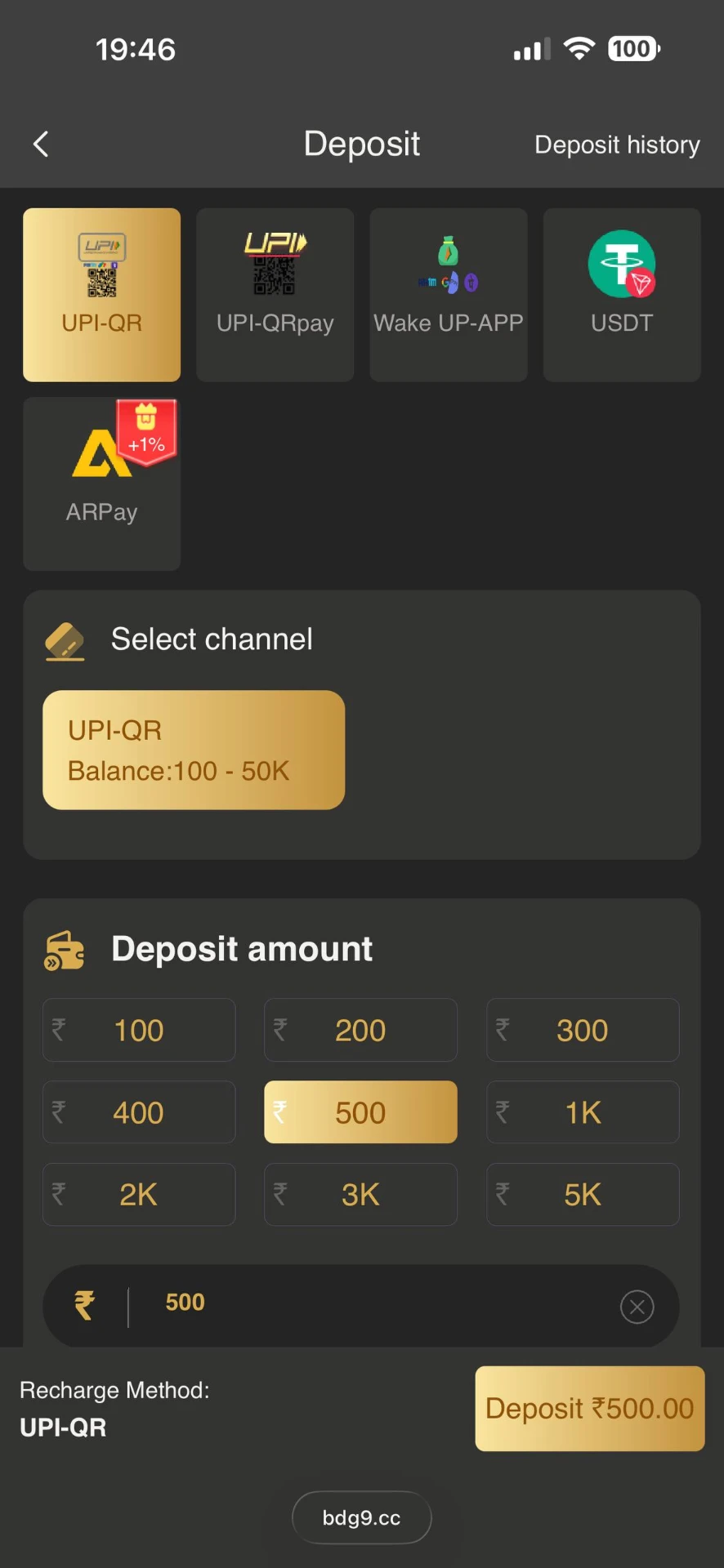
BDG Game deposit channel selection
Step 2 — Pay and submit your UTR number
- Step-1.Scan the QR code with Paytm, PhonePe, Google Pay or any UPI app and pay the exact amount.
- Step-2.Copy the UTR / transaction reference number shown in your UPI app after the payment.
- Step-3.Return to BDG Game, paste the UTR in the Input UTR field and tap Submit.
- Step-4.Wait a few seconds — your wallet balance updates once the payment is verified.
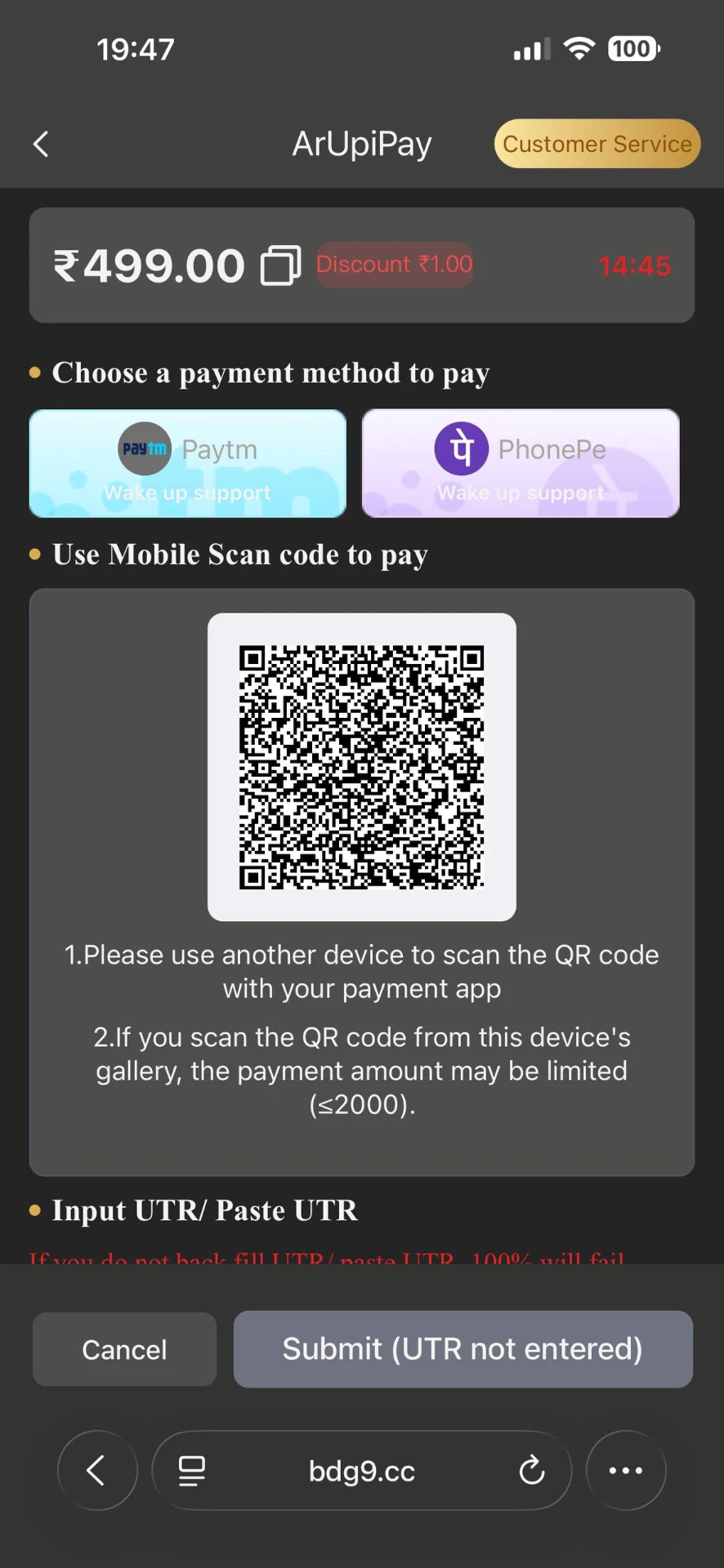
Payment submit with UTR number
Fast deposits
UPI payments are usually credited within seconds after UTR verification.
UPI apps supported
Paytm, PhonePe, Google Pay and any UPI-compatible app work with the QR code.
USDT option
Crypto players can choose the USDT channel for deposits.
ARPay +1% bonus
ARPay channel may add a small extra bonus on qualifying deposits.
Always enter or paste the correct UTR number. If you skip this step, the deposit may not be matched to your account and your wallet balance will not update. If a payment is delayed, keep the transaction screenshot and UTR handy before contacting customer support.
Promotion & Agency
BDG Game Promotion, Agency Commission & Bonus
The Promotion (Agency) area is where referral earnings are shown. Share your invitation link or invitation code, and the players who join under you become your direct and team subordinates. Commission is calculated daily on their activity, and the higher your agency level, the higher the commission rate.
- Step-1.Open the Promotion / Agency section from the BDG app home screen or menu.
- Step-2.Check yesterday's total commission shown at the top of the Agency page.
- Step-3.Review your direct subordinates (players who used your invitation link or code).
- Step-4.Review your team subordinates (full downline including indirect invites) and level progress.
- Step-5.Copy your invitation link or invitation code and share it on WhatsApp, Telegram or other channels.
- Step-6.As team activity grows, your agency level increases and commission rate improves.
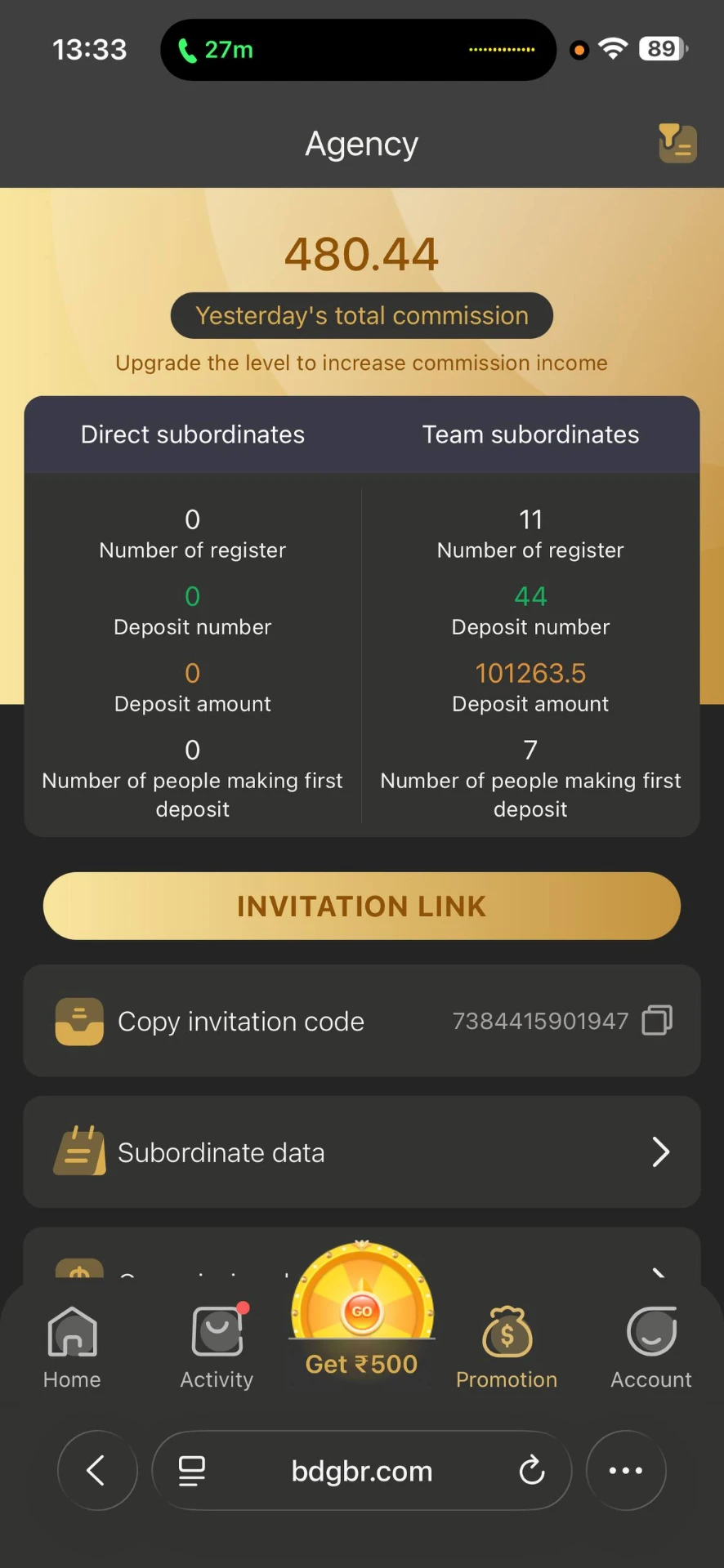
BDG Game Agency screen showing commission, direct and team subordinate statistics
- Step-1.Open the Activity page from the bottom menu or home screen.
- Step-2.Check today's bonus and total bonus at the top of the page.
- Step-3.Tap Invitation bonus to see rewards for inviting new players who register and deposit.
- Step-4.Use Betting rebate, Super Jackpot and Invite Wheel for extra reward opportunities.
- Step-5.Enter daily gift or redemption codes under Gifts to receive bonus rewards.
- Step-6.Claim Attendance bonus and Recharge bonus on qualifying days and amounts.
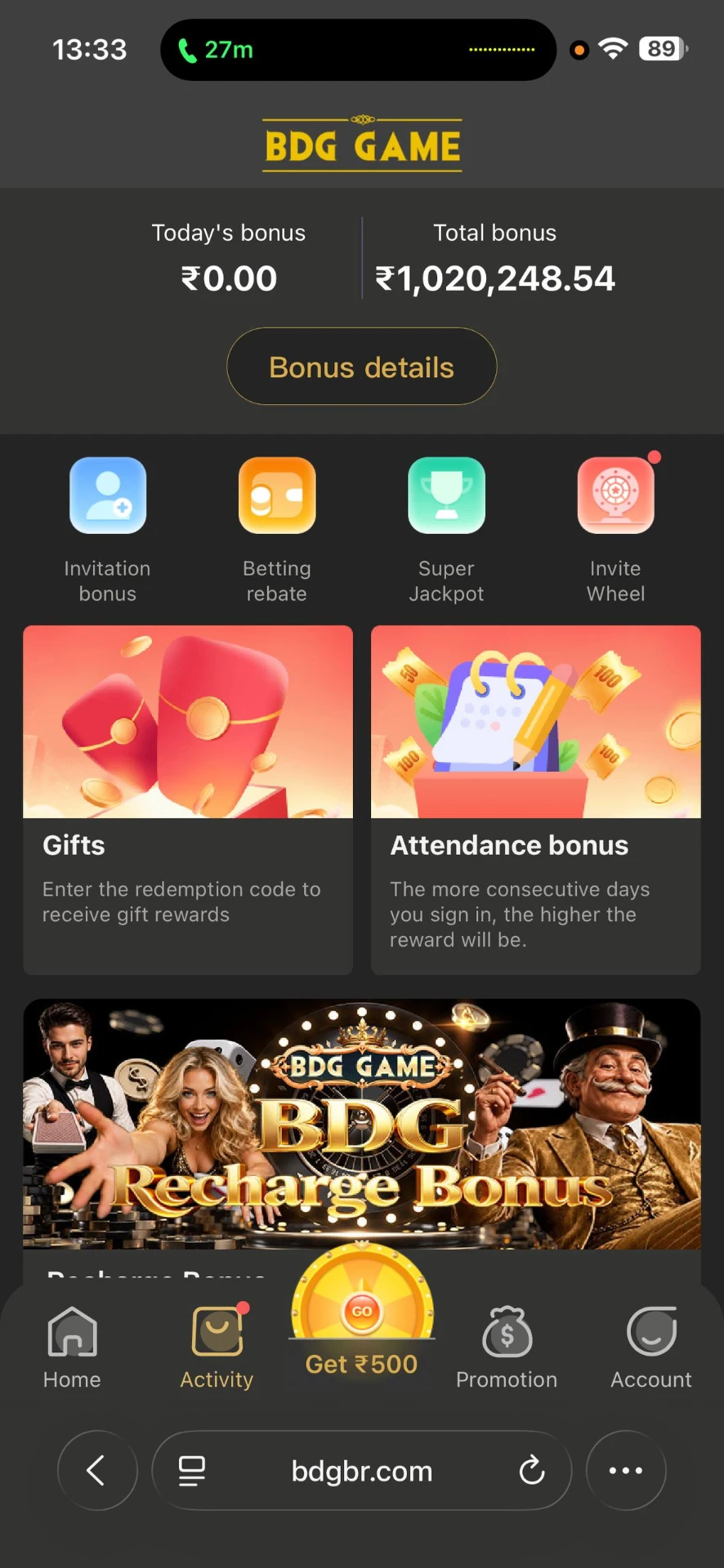
BDG Game Activity screen showing invitation, rebate, jackpot and recharge bonuses
What the Agency screen shows
Yesterday's total commission
Total referral commission credited for the previous day, shown at the top of the Agency page.
Upgrade level, higher income
Agency levels increase the commission rate, so more team activity means a higher payout percentage.
Direct subordinates
Players who registered using your own invitation link or code.
Team subordinates
The full downline, including players invited by your direct subordinates.
Register, deposit & first-deposit counts
For both direct and team levels you can see number of registers, deposit number, deposit amount and first depositors.
Invitation link & code
Copy your invitation link or invitation code in one tap and share it on WhatsApp, Telegram or anywhere else.
Bonus types on the Activity page
Today's bonus & total bonus
The Activity page shows today's bonus and lifetime total bonus, with a Bonus details view for the full breakdown.
Invitation bonus
A one-time reward for each invited player who registers and completes the required first deposit.
Betting rebate
A small percentage returned on your own play volume, credited automatically.
Super Jackpot
Extra jackpot rewards triggered during qualifying rounds.
Invite Wheel
A spin-style reward unlocked by inviting new players.
Gifts / redemption codes
Enter a gift or redemption code to receive bonus rewards in your wallet.
Attendance bonus
The more consecutive days you sign in, the bigger the daily reward becomes.
Recharge bonus
Extra bonus added on qualifying recharge amounts and payment channels.
Get ₹500 wheel
The centre button in the bottom menu opens the welcome ₹500 reward activity.
Commission and bonus amounts depend on your team's real activity and the platform's current rates, so the figures shown on your own Agency page will differ. Amounts shown in any screenshot online are examples only, not a promise of earnings. 18+ only.